Table of Contents
Quo Review 2026: Is Quo the Right AI-Powered Business Phone System?
For many small businesses, customer communication starts with a personal mobile number, a shared inbox, email threads, or a collection of disconnected messaging tools. That setup may work when a company has one person answering every call. It becomes much harder once several employees need to answer the same customers, share context, follow up on leads, or handle calls outside normal business hours.
A modern business phone system is supposed to solve that problem.
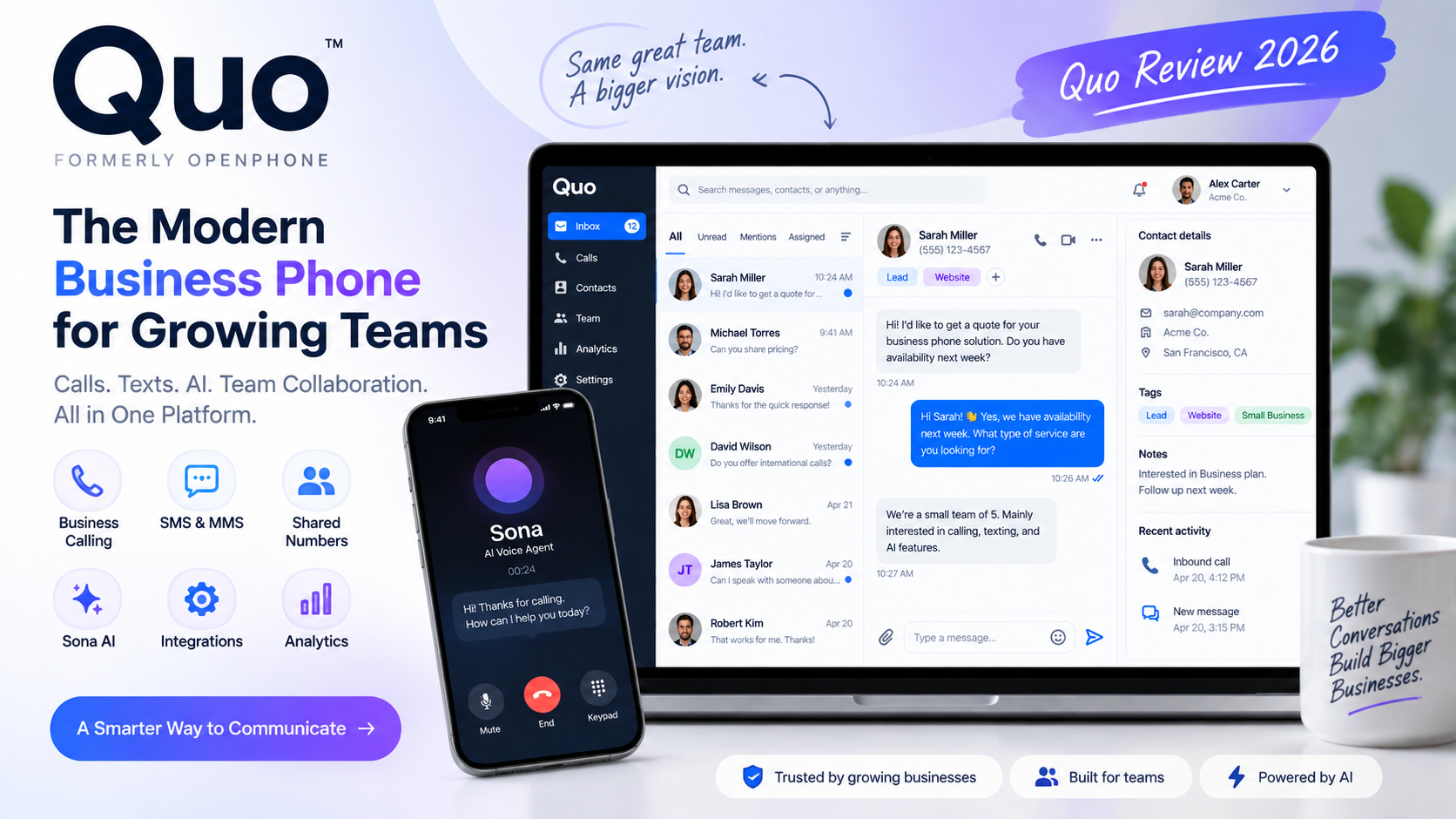
Quo approaches it from a cloud-first perspective. Rather than functioning only as a replacement for a traditional desk phone, it combines business calling, SMS/MMS, shared phone numbers, team collaboration, call management, CRM integrations, automation, and AI features in one platform.
The company was previously known as OpenPhone and officially rebranded as Quo in September 2025. The rebrand did not represent a complete replacement of the underlying product; instead, Quo positioned the change as an expansion from a business phone product toward a broader customer-communication platform. The company also introduced a significantly expanded role for Sona, its AI agent. [Official Quo announcement]
That makes Quo particularly interesting in 2026.
The important question is no longer simply whether Quo can provide a business phone number. Many cloud phone platforms can do that.
The more useful question is whether Quo’s combination of shared communications, AI-assisted workflows, Sona, automation, integrations and relatively straightforward pricing makes sense for a particular business.
This review examines the platform from that perspective.
Quo Quick Verdict
Quo is a cloud-based business communications platform built around business phone numbers, calling, messaging, shared team communication and AI-powered workflows.
Its strongest differentiator is the combination of a relatively simple business phone experience with collaborative shared numbers and increasingly capable AI functionality.
The platform is particularly relevant to:
- Small businesses
- Startups
- Remote teams
- Sales teams
- Agencies
- Professional service companies
- Customer-support teams
- Local service businesses
- Businesses that want AI-assisted phone workflows without deploying a traditional enterprise contact-center platform
Quo’s current pricing starts at $19 per user/month when billed monthly, or $15 per user/month when billed annually. Business is $33 monthly or $23 annually, while Scale is $47 monthly or $35 annually.
All plans currently include a Quo phone number, US/Canadian calling and messaging, voicemail transcripts, the Quo API, Sona AI and ChatGPT/Claude MCP access.
The biggest pricing consideration is that Sona uses automation credits. Each plan includes 1,000 credits, corresponding to approximately 10 Sona calls under Quo’s current pricing model. Additional credit packages cost extra.
The platform also becomes considerably more capable at the Business tier, where AI call summaries and transcripts, group calling, call transfers, CRM integrations, phone menus, analytics and automatic call recording are included.
For a simple individual business line, Starter may be sufficient.
For a team that wants the platform to become part of its sales or support workflow, Business is the more feature-rich tier.
For teams needing AI call classification and additional support, Scale adds another layer.
What Is Quo?
Quo is a cloud business phone and customer communication platform.
At its core, the service provides businesses with phone numbers that can be used for calling and texting without requiring traditional telephone hardware.
But describing Quo simply as a “phone app” misses much of what the current product is trying to accomplish.
The platform combines several categories:
- Business VoIP
- Cloud phone systems
- Business SMS/MMS
- Shared team numbers
- Call routing
- Voicemail
- Call recording
- Transcription
- AI summaries
- AI-assisted messaging
- AI voice agents
- CRM integrations
- Automation
- API connectivity
- MCP connectivity
The distinction matters because the value of Quo increasingly comes from what happens around a phone conversation.
A sales representative may receive a call, have the conversation transcribed, review an AI-generated summary, update the CRM, assign a follow-up task and continue communicating with the customer through SMS.
A service business could use a shared number so multiple employees can answer the same customers without exposing personal phone numbers.
An AI agent such as Sona can handle incoming calls when employees are unavailable.
This makes Quo closer to a business communications workspace than a conventional phone application.
Quo vs OpenPhone: What Changed?
If you search for Quo, you will encounter a significant amount of OpenPhone information.
That is because Quo is the current brand of the company and product previously known as OpenPhone.
The company announced the rebrand in September 2025. Quo stated that the change represented a new chapter rather than a fundamental abandonment of the product customers already knew.
One of the most important changes surrounding the rebrand was the expanded role of Sona.
Previously positioned primarily around missed-call handling, Sona was presented as evolving into a broader AI front-office agent capable of supporting sales, support and customer conversations.
This creates an important distinction when reading older reviews.
An OpenPhone review from 2023 or 2024 may still describe the underlying business-phone experience accurately, but it should not automatically be treated as an accurate description of Quo’s 2026 AI functionality or pricing.
For current purchasing decisions, Quo’s current documentation and pricing should take priority over historical OpenPhone reviews.
How Quo Works
Getting started with Quo follows a relatively straightforward cloud-phone workflow.
1. Create a Quo account
Users begin by creating a workspace and selecting a plan.
Quo currently provides a seven-day free trial.
2. Choose a plan
The three main plans are:
- Starter
- Business
- Scale
The difference between the plans is primarily the level of calling, collaboration, analytics, AI and support functionality.
3. Add or port a phone number
Each user receives one new or ported local or toll-free number.
Businesses can also create shared numbers for teams or departments.
Existing eligible numbers can be ported into Quo.
4. Configure users
Invite teammates and assign access to the appropriate numbers and conversations.
5. Set up calling
Configure call routing, business hours, ring groups and other call-management settings depending on the plan and workflow.
6. Set up messaging
Teams can communicate with customers using business SMS and MMS.
7. Create shared numbers
A shared number can be used by multiple team members.
This is one of the platform’s most important collaboration features.
8. Configure business hours
Businesses can define when calls should be handled by people, routed differently or sent toward other options.
9. Configure call routing
Quo supports visual call-flow configuration, ring orders and phone menus on appropriate plans.
10. Connect integrations
Business customers can connect supported CRM and automation tools.
11. Configure AI features
Depending on the workflow, teams can use AI-generated message responses, call summaries, transcripts, contact suggestions, AI tags and Sona.
12. Start communicating
Once configured, the business can begin using Quo across supported web, desktop and mobile experiences.
Why Quo Stands Out
Quo’s differentiation is not one isolated feature.
It is the way several relatively familiar capabilities are combined.
Shared numbers
Multiple employees can work from the same business number.
This means a customer does not necessarily need to know which individual employee originally handled the conversation.
Calling + messaging
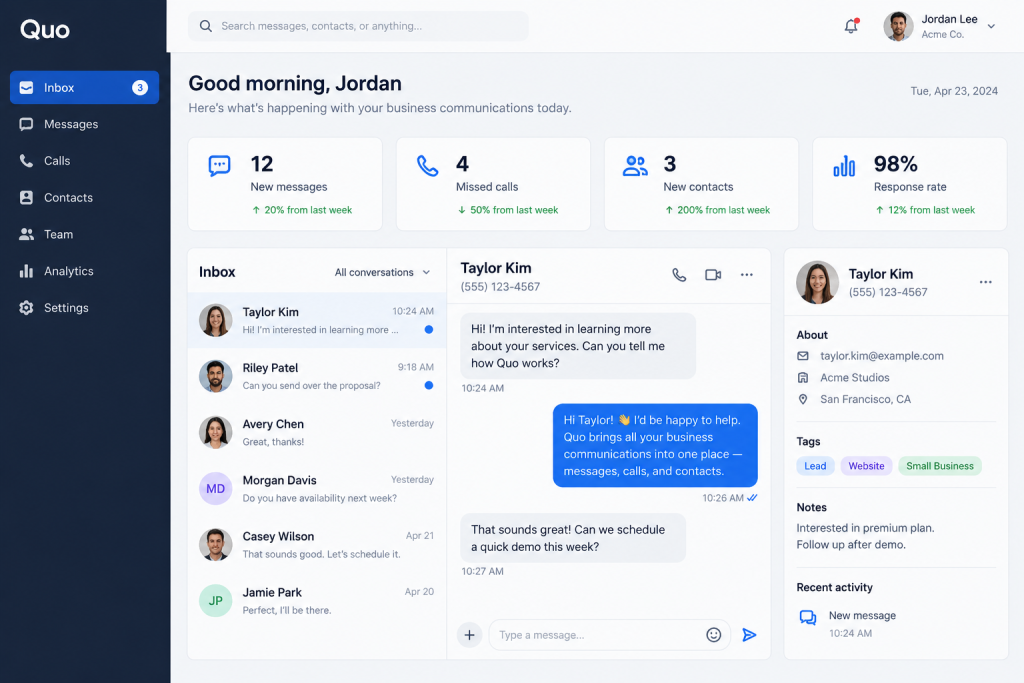
Calls, texts, voicemails and related conversation history can exist within the same communication environment.
Team collaboration
Internal threads, mentions, tasks, shared conversations and visibility features are designed to prevent employees from duplicating work.
AI
Quo has expanded beyond traditional VoIP with AI summaries, transcripts, suggested contacts, AI-assisted messages, call tags and Sona.
Automation
Quo can connect communications to external workflows through its API and supported integrations.
MCP
Quo now advertises ChatGPT and Claude MCP support, which is particularly relevant to developers and AI workflow builders.
The result is a platform positioned between a conventional cloud phone system and an AI-enabled customer communication layer.
Quo Business Phone System
The traditional business phone system remains the foundation of Quo.
The platform currently supports functionality such as:
- Local numbers
- Toll-free numbers
- Number porting
- Caller ID
- Incoming calls
- Outgoing calls
- Call forwarding
- Call routing
- Ring groups
- Phone menus
- Call transfers
- Group calling
- Voicemail
- Voicemail transcription
- Call recording
- Call summaries
- Call transcription
- Business hours
- International calling as an add-on
Quo’s approach is intentionally cloud-oriented.
Instead of installing a physical PBX and configuring desk phones, a business can manage its communications through software.
That is particularly useful for distributed teams.
Business Phone Numbers
A Quo workspace gives each user one included local or toll-free phone number.
Businesses can also use shared numbers.
Additional phone numbers currently cost $5 per number per month.
Quo supports local US and Canadian numbers as well as North American toll-free numbers.
The practical advantage is that a company can separate communication channels.
For example:
- Main company number
- Sales number
- Support number
- Recruiting number
- Location-specific number
- Individual employee number
This creates a more organized communication structure than having customers call employees directly on personal mobile numbers.
Shared Phone Numbers
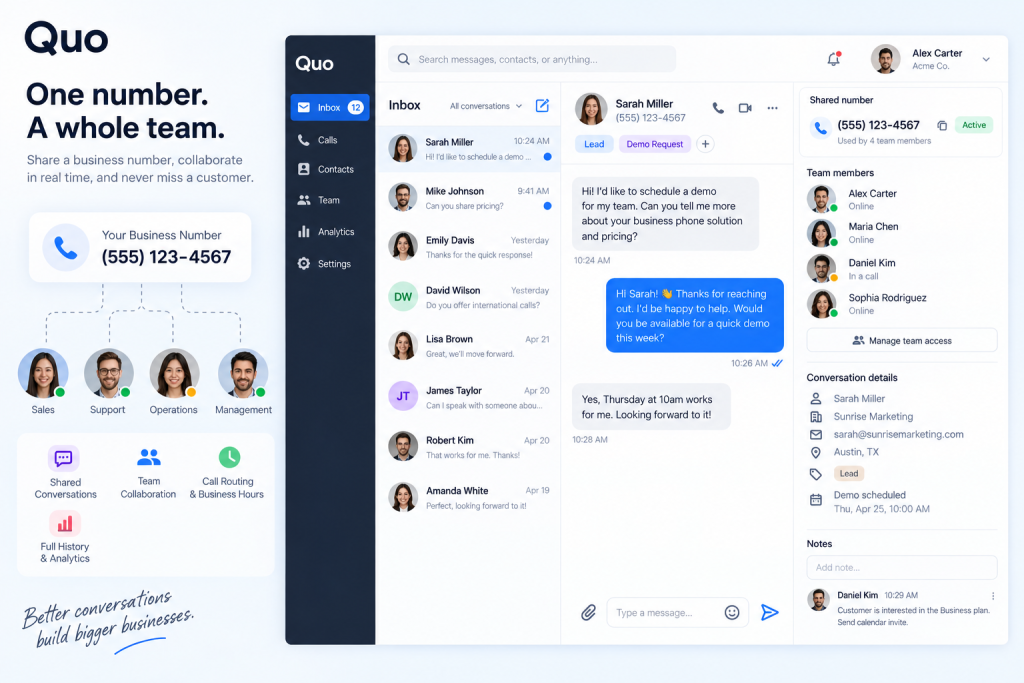
Shared numbers are one of Quo’s most important features.
A shared number allows multiple teammates to work with the same customer-facing phone line.
Suppose a home-services company has five employees.
Instead of sending every customer to one employee’s personal number, the company could use one shared business number.
When customers call, available team members can receive the call according to the configured routing behavior.
When customers text, authorized employees can see the conversation.
The team can also maintain shared context.
This matters because customer communication often fails when information is trapped inside one employee’s device.
A shared communication system reduces that dependency.
Sales team
A sales number can be shared among representatives.
Customer support
Support employees can access the same customer conversation history.
Service business
Technicians and office staff can coordinate around incoming calls and messages.
Agency
An agency can maintain customer-facing numbers while allowing multiple employees to respond.
Real estate team
Multiple agents can work from a shared lead number.
Startup
Founders and early employees can operate a company number without exposing personal phone numbers.
The limitation is that shared communication also requires clear ownership and internal processes.
Technology can provide visibility, but the team still needs to decide who owns a lead, who responds, and when a conversation should be escalated.
Business Calling
Quo provides the core capabilities expected from a cloud business phone system.
These include:
- Caller ID
- Call history
- Call forwarding
- Call routing
- Ring groups
- Phone menus
- Call transfers
- Voicemail
- Call recording
- Group calling
- Call transcripts
- Call summaries
One useful aspect is the visual call-flow approach.
Instead of relying entirely on technical PBX configuration, businesses can design routing logic through a visual interface.
For example:
Incoming call → Business hours → Sales menu → Sales group → Backup routing
Or:
Incoming call → After-hours → Sona
This makes the system easier to reason about for a small business without a dedicated telecom administrator.
Business SMS and MMS
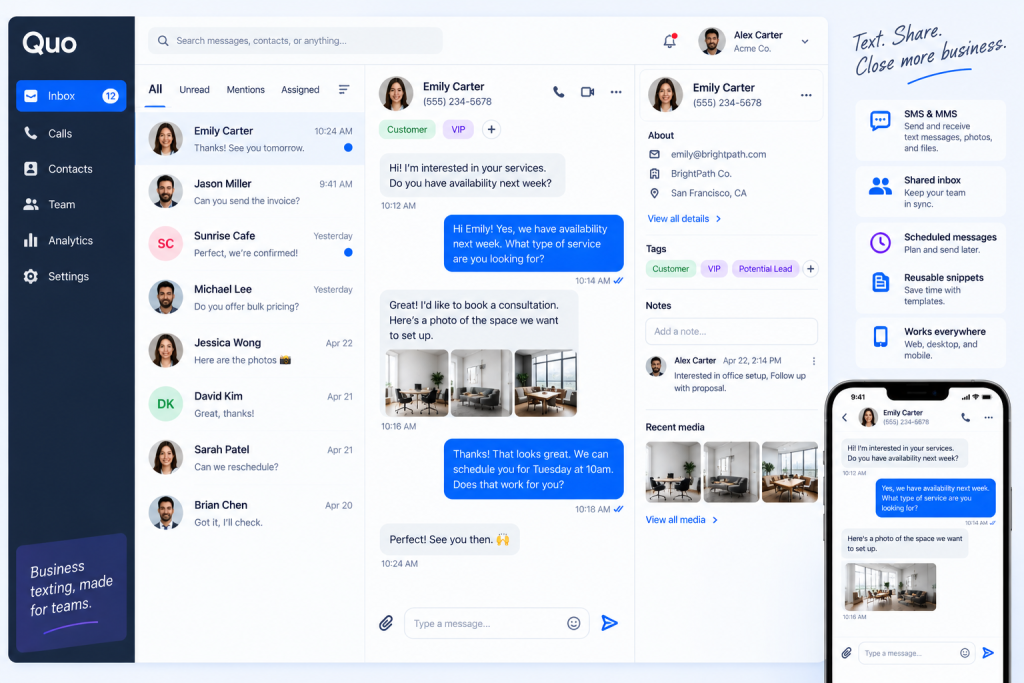
Quo also treats messaging as a first-class business communication channel.
Businesses can use SMS and MMS for:
- Lead follow-up
- Appointment reminders
- Customer questions
- Quote follow-up
- Service updates
- Scheduling
- Sales communication
Shared inbox functionality means multiple team members can work with conversations rather than forcing every customer interaction into an individual employee’s phone.
Quo also supports scheduled text messages and reusable snippets.
AI-assisted responses can suggest messages based on conversation context.
However, businesses sending messages to US numbers need to pay attention to carrier requirements and registration rules.
Quo notes that carrier registration is required for US business texting, and its current pricing page lists carrier review/setup fees and recurring messaging-related fees.
Therefore, the advertised subscription price should not automatically be treated as the complete cost of a messaging-heavy business.
Shared Inbox and Team Collaboration
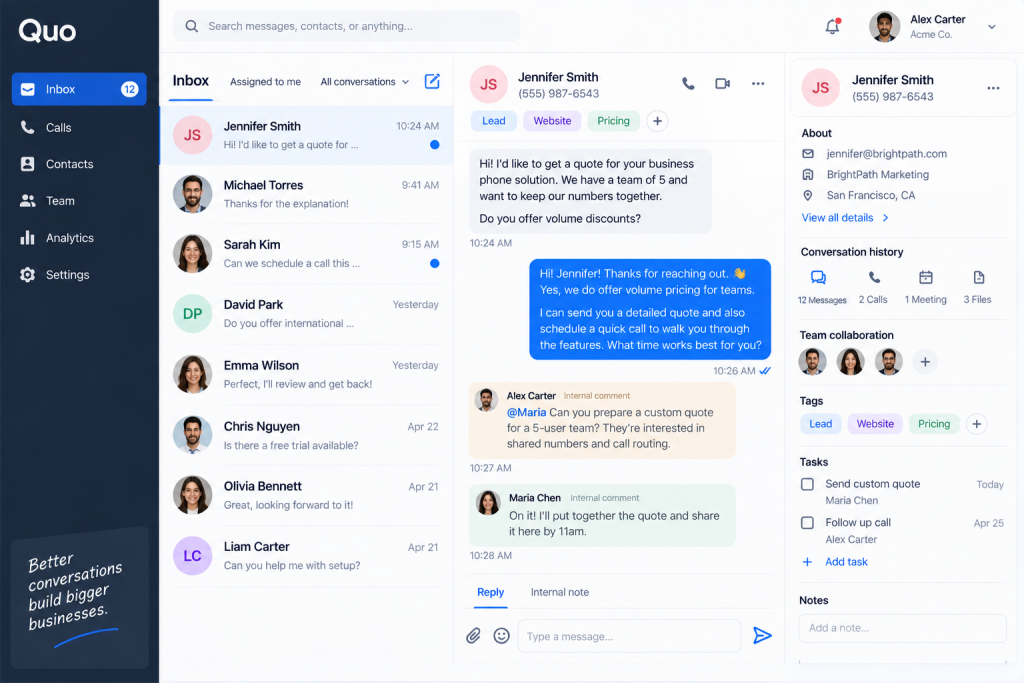
The shared inbox is where Quo begins to look less like a conventional VoIP service.
Team members can see customer conversations and collaborate internally without sending internal discussion to the customer.
Relevant collaboration features include:
- Internal threads
- Mentions
- Tasks
- Shared contacts
- Team activity
- Inbox visibility
- Shared numbers
- Conversation history
- Presence awareness
This addresses a common operational problem.
Imagine a customer calls a company on Monday.
Employee A handles the conversation.
The customer texts again on Tuesday.
Employee B responds.
Without shared context, Employee B may ask the customer to explain everything again.
With shared communication history, Employee B can review what happened previously.
That is not merely a phone-system feature.
It is a workflow feature.
Voicemail and Transcription
Traditional voicemail creates another administrative task: listening to messages.
Quo provides voicemail transcription, allowing users to read the content instead.
This is useful when:
- The employee is in another meeting
- The message is long
- The employee needs to search information
- The team needs to quickly triage incoming requests
However, transcription should never be treated as perfect.
Names, addresses, product terms and technical language can be transcribed incorrectly.
For high-stakes communication, the original recording may still need to be reviewed.
Quo AI Features
AI is now central to Quo’s product positioning.
Current AI-related capabilities include:
- Sona
- AI call summaries
- Call transcripts
- AI-generated message responses
- AI contact suggestions
- AI call tags
- ChatGPT/Claude MCP connectivity
- Automation features
The important distinction is that these features serve different purposes.
Some reduce administrative work.
Others automate customer communication.
Others connect phone data to external systems.
What Is Sona?
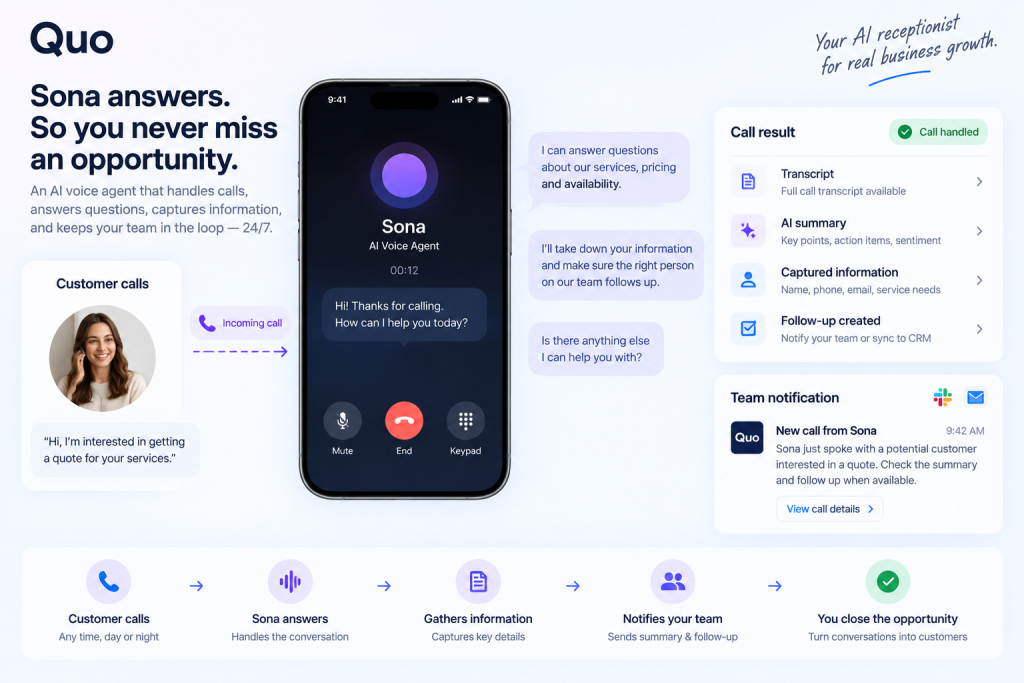
Sona is Quo’s AI voice agent.
The concept is different from traditional voicemail.
Instead of simply recording a message after a missed call, Sona can interact with callers.
Quo describes Sona as an always-on AI agent that can:
- Answer calls
- Respond to common questions
- Capture information
- Take messages
- Support customer conversations
- Operate outside normal business hours
- Produce call records and summaries
This changes the workflow from:
Customer → call → no answer → voicemail
to:
Customer → call → Sona → conversation → captured information → team follow-up
That distinction can be significant for businesses where missed calls represent potential leads.
Example
A customer calls a home-services company at 8:30 PM.
Nobody is available.
Instead of hearing voicemail, the caller can interact with Sona.
Sona can collect information about the requested service and capture relevant details.
The team can then review the resulting interaction later.
This does not eliminate the need for human employees.
It moves the human interaction to the point where human judgment is most useful.
Sona Pricing and Automation Credits
Quo currently includes 1,000 automation credits with every plan.
The pricing page describes this as approximately 10 Sona calls.
Additional tiers currently include:
| Tier | Monthly Price | Included Credits | Approx. Calls |
|---|---|---|---|
| Tier 1 | $0 | 1,000 | 10 |
| Tier 2 | $25 | 4,000 | 40 |
| Tier 3 | $49 | 10,000 | 100 |
| Tier 4 | $99 | 25,000 | 250 |
| Tier 5 | $199 | 60,000 | 600 |
The effective per-call overage rate decreases as the purchased credit package increases.
The important purchasing implication is that Sona should be treated as a usage-based AI component rather than assuming that the normal per-user subscription represents the complete cost of heavy AI receptionist usage.
A company receiving only a handful of AI-handled calls may have a very different cost profile from a business routing hundreds of calls through Sona.
AI Call Summaries
AI call summaries are designed to reduce the administrative work associated with reviewing calls.
Instead of asking an employee to listen to an entire recording, the platform can produce a summarized version of the conversation.
This can be useful for:
- Sales calls
- Customer support
- Client meetings
- Follow-up
- Team handoffs
- Manager review
A useful workflow might be:
Call → Recording → Transcript → Summary → Action items → CRM
The value is primarily time savings.
The limitation is that AI summaries are interpretations.
They can miss context, misunderstand terminology or fail to recognize the importance of something that was discussed.
For important sales commitments, financial information or sensitive customer issues, human review remains appropriate.
Call Transcriptions
Transcription converts spoken conversations into searchable text.
Potential use cases include:
- Sales coaching
- Customer support QA
- Follow-up
- Documentation
- Internal handoff
- Conversation review
Transcripts can also make AI functionality possible because downstream AI systems can analyze the text.
But transcription quality depends on factors such as:
- Audio quality
- Accents
- Background noise
- Multiple speakers
- Industry terminology
- Network conditions
A transcript should therefore be treated as a useful working representation rather than an infallible record.
AI Call Tags
AI call tags are available on the Scale plan.
The basic concept is to automatically classify calls according to topics that matter to a business.
For example, a company could potentially use call classification to identify conversations related to:
- New leads
- Pricing questions
- Existing customers
- Support issues
- Cancellations
- Product inquiries
This can become useful when call volume is too high for managers to manually inspect every conversation.
It also provides a bridge between individual conversations and operational analytics.
AI Message Responses
Quo provides AI-assisted text responses.
The system can analyze a conversation and suggest responses, or users can provide instructions for generating a message.
This can reduce repetitive writing.
For example, a customer might ask:
“Can I move my appointment from Thursday to Friday?”
Instead of manually composing the same type of response, the employee can use AI assistance and then review the suggested text.
This is especially useful for teams that send large numbers of similar customer messages.
The important limitation is obvious: AI-generated text still needs human oversight.
A polished answer can still contain incorrect information.
AI Contact Suggestions
Quo’s AI contact suggestions use information from voicemail and call-summary transcriptions to identify potentially missing contact information.
The system can look for information such as:
- First name
- Last name
- Company
- Contact role
This addresses a small but common operational problem.
Employees often receive useful information during calls but never update the CRM or contact database.
Automating contact suggestions can reduce that manual work.
MCP and AI Agents
One of the more technically interesting developments is Quo’s support for ChatGPT and Claude MCP.
MCP, or Model Context Protocol, provides a standardized way for AI systems to interact with external tools and information.
For a business communications platform, that opens interesting possibilities.
Instead of AI existing only inside a chatbot, an AI assistant could potentially interact with phone-related workflows.
For example:
AI assistant → Quo → customer communication
Or:
Customer conversation → Quo → AI analysis → workflow
Or:
Call → transcript → AI → action item → business system
For developers and RevOps teams, this is potentially more important than another isolated AI writing feature.
The value of MCP depends on what actions and permissions are actually available through the implementation.
Businesses should therefore evaluate the documented MCP capabilities rather than assuming that an AI assistant can autonomously perform every possible phone operation.
Automation
Quo can connect communication workflows to external systems through integrations, automation platforms and its API.
A useful example is:
Incoming call → Sona → information captured → call record → CRM → team notification
Another could be:
Customer text → employee response → CRM activity → follow-up task
Automation becomes especially valuable when communication is repetitive.
The key is to automate administrative work while keeping humans responsible for decisions that require judgment.
CRM Integrations
Quo currently highlights CRM integrations including HubSpot and Salesforce.
The platform also references integrations with tools such as Jobber and broader automation ecosystems.
CRM connectivity matters because a phone system can otherwise become an isolated data silo.
For sales teams, the objective is to connect communication activity with customer records.
For example:
Contact → Call → Call history → CRM record
This allows salespeople to understand the communication history without manually reconstructing it.
The exact fields and automation behavior depend on the integration and should be checked against current documentation before implementation.
Other Integrations
Quo also supports connections to automation platforms such as Zapier and Make, along with its own API.
That creates a broader ecosystem around the core phone system.
For example, an agency could theoretically connect:
Quo → Make → CRM → Slack → internal notification
Or:
Quo → API → custom application
The API is particularly relevant when standard integrations do not provide enough control.
Quo API
The Quo API is included across the current plans.
That is significant because API access is often restricted to higher tiers in SaaS products.
The API provides a path for developers to build custom integrations around Quo’s communication infrastructure.
Potential developer use cases include:
- Messaging
- Contact workflows
- Call-related data
- Custom business applications
- Automation
- External system synchronization
The API is most useful for technical teams.
A non-technical business owner may gain more value from the native integrations or automation platforms.
A developer, on the other hand, may use the API to create workflows that would not be practical through the standard interface.
Cross-Platform Experience
Quo is designed around a software-based communication model rather than physical desk phones.
Users can access the service through web, desktop and mobile experiences.
That makes it appropriate for remote teams.
A salesperson can work from a laptop.
A field technician can use a mobile device.
A manager can review conversations from a desktop.
The underlying advantage is that the business number belongs to the company workspace rather than being permanently tied to one physical phone.
Quo for Remote Teams
Remote businesses are one of the natural use cases for cloud phone systems.
Consider a five-person startup distributed across several cities.
A traditional phone system might require more infrastructure than the business wants to maintain.
With Quo, the team can use:
- Shared numbers
- Individual business numbers
- Shared conversations
- Internal threads
- Call routing
- Business SMS
- AI summaries
- CRM integrations
The result is a communication layer that follows the team rather than the office.
Quo for Sales Teams
Sales teams can use Quo at several stages of the funnel.
Lead response
A new lead calls the business.
The call can be routed to available salespeople.
Outbound calling
Sales representatives can use business numbers rather than personal mobile numbers.
SMS follow-up
After a call, the representative can continue the conversation through text.
Qualification
Sona can potentially handle initial conversations and collect information.
Call summaries
Salespeople can review AI-generated summaries instead of manually writing notes.
CRM logging
Communication data can be connected with supported CRM systems.
Follow-up automation
API and automation integrations can reduce repetitive administrative work.
The main benefit is not simply making calls.
It is reducing the amount of manual work that occurs before and after the call.
Quo for Customer Support
A small support team can use Quo for:
- Shared support numbers
- Call routing
- Phone menus
- Shared inboxes
- Call recording
- Transcription
- AI summaries
- Sona
- Internal collaboration
A customer-support workflow might look like:
Customer → support number → routing → employee → call → summary → follow-up
If the team is unavailable:
Customer → support number → Sona → information → team review
This can extend the effective operating hours of a small support team without requiring a traditional 24/7 call center.
Quo for Service Businesses
Service businesses often depend heavily on incoming calls.
Examples include:
- Contractors
- Home services
- Real estate
- Consultants
- Agencies
- Local professional services
For these businesses, the most important Quo features may not be advanced AI.
They may simply be:
- A professional business number
- Shared access
- Call routing
- SMS
- Missed-call handling
- Appointment communication
- Team visibility
AI becomes an additional layer rather than the entire reason to buy the product.
Quo for Agencies
Agencies can use shared numbers to separate customer communications from employee personal numbers.
A client-facing number could be shared by:
- Account manager
- Project manager
- Sales representative
- Support employee
Internal threads can keep team discussions separate from customer-facing communication.
AI summaries can also make client handoffs easier.
The main limitation is that agencies managing many clients may eventually need more sophisticated contact-center or CRM infrastructure depending on their workflow.
Quo for Startups
Quo fits the startup model particularly well because the infrastructure is software-based.
A startup can begin with a small number of users and add numbers or users as the team expands.
The advantages include:
- Low hardware requirements
- Remote accessibility
- Shared numbers
- Business SMS
- CRM integration
- AI functionality
- API access
As the company grows, however, communication requirements may become more complex.
Larger organizations may need deeper enterprise administration, advanced contact-center functionality or specialized compliance capabilities.
Quo Pricing
Quo currently offers three plans.
| Plan | Monthly Billing | Annual Billing | Positioning |
|---|---|---|---|
| Starter | $19/user/month | $15/user/month | Core business phone |
| Business | $33/user/month | $23/user/month | Advanced calling, collaboration and AI |
| Scale | $47/user/month | $35/user/month | Advanced AI, support and call tagging |
Annual billing is currently discounted relative to monthly billing.
All plans include:
- One new or ported phone number per user
- US/Canadian calling and messaging
- Voicemail transcripts
- Quo API
- Sona
- ChatGPT/Claude MCP
- 1,000 automation credits
There are also additional costs to consider.
These include:
- Additional phone numbers
- Carrier registration/setup fees
- Messaging-related fees
- International calling and messaging
- Sona usage beyond included credits
Starter Plan
Starter is designed for businesses that primarily need the core communication platform.
It includes the basic phone and messaging infrastructure along with voicemail transcription, API access and Sona.
It can make sense for:
- Solo founders
- Small businesses
- Basic business phone requirements
- Teams that do not need advanced CRM integration
The limitation is that several advanced team and AI features are reserved for Business.
Business Plan
Business is where Quo becomes significantly more sophisticated.
It adds:
- AI call summaries and transcripts
- Group calling
- Custom ring orders
- Call transfers
- HubSpot integration
- Salesforce integration
- Phone menus
- Analytics and reporting
- Automatic call recording
- Live chat support
For a team using Quo as an operational communications platform rather than simply a business number, these additions are important.
Scale Plan
Scale adds:
- AI call tags
- Dedicated onboarding
- Priority live chat and email support
- Inbound phone support
Scale is more relevant when communication volume and operational requirements justify a higher subscription.
The additional support may also matter for businesses where phone infrastructure is operationally important.
Total Cost of Ownership
The headline subscription price is only part of the calculation.
A business should consider:
Users + phone numbers + messaging fees + carrier fees + international usage + Sona usage + optional services
For example, a five-person team on Business at the annual rate would have a base subscription of:
5 × $23 = $115/month
That is before additional numbers, messaging-related charges, international usage or additional Sona credits.
This is why evaluating Quo solely from the per-user price can produce an incomplete picture.
Quo vs Traditional Phone Systems
| Category | Quo | Traditional PBX |
|---|---|---|
| Setup | Software-based | Hardware/configuration |
| Hardware | Minimal | Often required |
| Remote work | Native fit | Requires additional infrastructure |
| Shared communication | Built in | Configuration dependent |
| AI | Integrated | Usually additional tools |
| CRM integration | Available | Varies |
| Scaling | Add users/numbers | May require infrastructure changes |
| Maintenance | Cloud-managed | More IT responsibility |
The biggest difference is operational.
Traditional PBX systems can provide extensive telephony functionality, but they typically require more infrastructure and administration.
Quo moves much of that experience into software.
Quo vs Google Voice
Google Voice is particularly relevant for businesses already invested in Google Workspace.
Quo differentiates itself around:
- Shared business communication
- Team-oriented inboxes
- AI phone workflows
- Sona
- More extensive collaboration around conversations
- Dedicated business-phone workflow features
Google Voice may remain attractive for organizations that primarily want straightforward telephony integrated into Google’s ecosystem.
The decision depends heavily on whether the business needs a broader collaborative communication platform or mainly a Google-centric business phone service.
Quo vs Grasshopper
Grasshopper has historically focused heavily on small-business virtual phone functionality.
Quo adds a broader collaboration and AI layer.
The relevant differences include:
- Shared numbers
- Team collaboration
- AI
- Sona
- Call summaries
- CRM integrations
- Automation
- API access
A company comparing the two should evaluate whether it primarily needs a virtual business number or a more collaborative communication workspace.
Quo vs RingCentral
RingCentral operates across a broader communications category and has extensive enterprise-oriented capabilities.
Quo generally emphasizes simplicity and SMB-oriented communication workflows.
RingCentral may be more relevant where an organization needs complex enterprise communications, contact-center capabilities, administrative controls or broader unified communications infrastructure.
Quo can be more appropriate when the business wants a comparatively straightforward cloud phone system with integrated AI and team collaboration.
Quo vs Dialpad
Dialpad is another major AI-oriented business communications platform.
The comparison becomes particularly relevant around:
- AI calling
- Transcription
- Call summaries
- Analytics
- CRM integrations
- Business phone functionality
Both platforms place significant emphasis on AI.
The important distinction is not simply “which has AI?”
It is how the AI is integrated into the overall communication workflow and what each organization’s required calling, analytics and CRM capabilities are.
Quo vs Aircall
Aircall is particularly associated with sales and support teams.
Quo overlaps in areas such as:
- Business calling
- Shared numbers
- Sales communication
- Customer support
- Integrations
- Analytics
- AI
A business evaluating the two should focus on its workflow rather than the number of features.
For example:
- Small sales team
- Large support operation
- Contact-center workflow
- AI receptionist requirement
- CRM dependency
- Reporting requirements
These can produce different requirements.
Competitor Comparison
| Platform | Business Phone | Shared Communication | AI | CRM/Automation | Typical Fit |
|---|---|---|---|---|---|
| Quo | Yes | Strong | Sona + AI features | API + integrations | SMBs, startups, teams |
| Google Voice | Yes | Yes | More limited | Google ecosystem | Google-centric businesses |
| Grasshopper | Yes | Yes | More limited | Integrations | Small businesses |
| RingCentral | Yes | Yes | Extensive | Extensive | Larger organizations |
| Dialpad | Yes | Yes | Strong AI | Strong integrations | AI-oriented business communications |
| Aircall | Yes | Yes | AI capabilities | Sales/support integrations | Sales and support teams |
This table should be treated as a starting point rather than a universal ranking.
Top 15 Quo Features Worth Knowing About
1. Business Phone Numbers
Provides dedicated business numbers without requiring traditional phone infrastructure.
2. Number Porting
Businesses can move eligible existing numbers into the platform.
3. Calling
Core business calling functionality with routing and management features.
4. SMS/MMS
Customer communication can continue after the phone call.
5. Shared Numbers
Multiple team members can operate from one customer-facing number.
6. Shared Conversations
Teams can preserve communication history.
7. Voicemail Transcription
Users can read voicemail instead of listening to every message.
8. Call Recording
Available on Business and higher plans.
9. Call Transfers
Business users can transfer conversations between employees.
10. Phone Menus
Business customers can route callers through menu-based systems.
11. AI Call Summaries
Available on Business and higher plans.
12. Sona
AI voice agent available across the current plans.
13. AI Message Responses
Quo can suggest responses based on conversation context.
14. AI Contact Suggestions
Quo can identify contact information from transcribed communications.
15. API and MCP
Developers can connect Quo to external systems and AI workflows.
Quo Pros and Cons
Pros
- Cloud-first business phone system
- Strong shared-number workflow
- Calling and messaging in one environment
- Team collaboration features
- Sona included in all current plans
- API available across plans
- ChatGPT/Claude MCP support
- HubSpot and Salesforce integrations on Business
- AI summaries and transcripts on Business+
- Transparent three-tier pricing structure
- Seven-day free trial
- Suitable for remote teams
Cons
- Advanced functionality requires higher plans
- Sona introduces usage-based costs beyond included credits
- Messaging has carrier-related requirements and fees
- International usage is not included in the same way as US/Canadian calling and messaging
- Larger organizations may require capabilities beyond an SMB-focused platform
- AI output still requires human oversight
- VoIP performance depends on network and device conditions
Customer Reviews and User Sentiment
Independent customer feedback provides another perspective.
G2 currently lists Quo with a 4.7/5 average across more than 3,400 reviews.
The recurring positive themes associated with the product include:
- Ease of use
- Setup
- Team communication
- Shared numbers
- General usability
Third-party review analysis also identifies limitations around feature availability between plans and the additional cost structure for higher Sona usage.
Customer reviews should be interpreted carefully.
A review describing call quality, support or SMS behavior may be influenced by:
- Geography
- Carrier
- Device
- Internet connection
- Account configuration
- Plan
- Specific incident
Therefore, a handful of reviews should not be treated as universal evidence.
Call Quality
Quo uses VoIP infrastructure, meaning call quality depends partly on the underlying network.
Factors include:
- Internet stability
- Wi-Fi quality
- Device
- Browser
- Mobile connection
- Geographic conditions
- Carrier conditions
This means it would be inaccurate to promise identical call quality for every user.
A business evaluating Quo should test the platform using the actual devices and networks its employees will use.
Security and Privacy
Quo publishes security information covering its handling of customer data.
The company currently states that data in transit is protected using TLS 1.2+ and data at rest using AES-256 encryption.
Quo also states that it is SOC 2 Type II certified.
Its cloud-calling documentation additionally states GDPR compliance and availability of HIPAA compliance through a Business Associate Agreement for Business and Scale customers.
These are important claims, but businesses with regulated workloads should still review the applicable agreements, documentation and compliance scope rather than treating a certification as a substitute for their own security assessment.
Call Recording and Compliance
Call recording can be useful for:
- Training
- Quality assurance
- Documentation
- Customer-service review
- Sales coaching
But recording laws vary by jurisdiction.
Some jurisdictions require consent from one party, while others may require consent from all relevant parties.
Businesses should therefore establish appropriate policies before enabling automatic recording.
This is particularly important when calls involve:
- Financial information
- Healthcare information
- Sensitive customer data
- Employees
- Customers in multiple jurisdictions
The technology can provide recording.
The business remains responsible for using it appropriately.
Who Should Use Quo?
Solo founders
Useful when a founder wants a dedicated professional number without exposing a personal mobile number.
Small businesses
A strong use case because shared numbers and messaging can replace several disconnected communication methods.
Startups
Cloud infrastructure and remote accessibility make the platform suitable for distributed teams.
Sales teams
AI summaries, CRM integrations and calling workflows can reduce administrative work.
Customer support teams
Shared numbers, routing, recordings and Sona can support small support operations.
Agencies
Shared client communication can improve continuity between account and delivery teams.
Professional services
Consultants and similar businesses can maintain professional customer communication without a traditional phone system.
Who May Need Another Platform?
Quo may be less suitable when an organization requires:
- Highly specialized contact-center functionality
- Complex enterprise telephony
- Very advanced call-center reporting
- Unusual international telephony requirements
- Specialized telecom infrastructure
- Features unavailable in Quo’s current platform
In those situations, larger enterprise communications or specialized contact-center platforms may deserve consideration.
Quo by Company Size
Solo Business
Primary requirements are usually:
- One professional number
- Calling
- SMS
- Voicemail
- Basic AI
Starter may cover these requirements.
Startup
Startups may benefit from:
- Shared numbers
- Team collaboration
- CRM integration
- AI
- Automation
Business can become more relevant as team workflows become more complex.
Small Business
The main value comes from replacing fragmented communication with one shared environment.
Mid-Market
Requirements become more complex.
Teams may need deeper reporting, administration, integrations and support.
Enterprise
Enterprise requirements can include sophisticated contact-center functionality, compliance, administration and international telephony.
Those requirements should be evaluated carefully before assuming Quo is sufficient.
Real-World Workflows
Workflow 1 — New Lead
- Lead calls the business.
- Quo routes the call.
- Salesperson handles the conversation.
- Call is recorded/transcribed where configured.
- AI generates a summary where supported.
- CRM receives relevant information.
- Salesperson follows up.
Workflow 2 — Customer Support
- Customer calls support.
- Phone menu routes the call.
- Employee answers.
- Conversation is recorded where configured.
- Transcript and summary become available.
- Employee completes follow-up.
Workflow 3 — Missed Call
- Customer calls.
- Team is unavailable.
- Call reaches voicemail or Sona.
- Information is captured.
- Team reviews the interaction.
- Employee follows up.
Workflow 4 — AI Receptionist
- Customer calls.
- Sona answers.
- Sona handles supported questions.
- Sona captures relevant information.
- The interaction is logged.
- Human staff review the conversation when necessary.
Workflow 5 — Sales Follow-Up
- Sales call occurs.
- Transcript is generated.
- AI summary identifies important points.
- Follow-up action is created.
- CRM is updated.
- Customer receives SMS or another follow-up communication.
Workflow 6 — Remote Team
- Customer calls shared number.
- Available teammates receive the call.
- One employee answers.
- Other teammates retain visibility.
- Conversation history remains available.
- Follow-up can be assigned internally.
AI-Powered Business Communication
The evolution of business telephony can be viewed in three stages.
Traditional phone system
The phone connects two people.
Cloud phone system
The phone becomes software.
AI-powered communication platform
The communication itself becomes structured data that can be analyzed and acted upon.
Quo is moving toward the third model.
Calls can generate transcripts.
Transcripts can generate summaries.
Summaries can generate tasks.
AI agents can handle selected conversations.
APIs can connect communication data to other software.
MCP can potentially connect phone workflows to AI assistants.
The opportunity is significant.
The risk is equally important.
AI systems can misunderstand customers.
Automation can perform the wrong action.
Sensitive information can be processed incorrectly.
Permissions can be misconfigured.
Human oversight therefore remains important.
ROI Analysis
The strongest economic argument for Quo is not necessarily the phone subscription itself.
It is the potential reduction in administrative work and missed communication.
Time saved
Potential sources of time savings include:
- Manual call notes
- Manual call logging
- Voicemail review
- Contact entry
- Repetitive SMS writing
- Internal handoffs
Revenue opportunity
A faster communication process can potentially help businesses respond to leads more quickly.
It may also reduce missed calls.
However, these should be treated as potential operational benefits rather than guaranteed revenue increases.
A business should measure:
- Lead response time
- Missed calls
- Follow-up completion
- Time spent on call administration
- Customer response time
before claiming ROI.
Is Quo Legit?
Quo is the current brand of the company formerly known as OpenPhone.
The company publicly announced its rebrand in September 2025 and disclosed a $105 million financing round at the time.
The product is commercially available, has public documentation and is listed on independent software review platforms.
G2 currently lists thousands of reviews for Quo.
These are useful indicators when evaluating whether the service is an established commercial software product.
Is Quo Safe?
There is no meaningful way to describe any internet communications platform as universally “100% safe.”
A more useful assessment is to examine its documented security controls and the way the business intends to use the service.
Quo currently documents:
- TLS 1.2+ encryption in transit
- AES-256 encryption at rest
- SOC 2 Type II certification
- Privacy and security policies
- Compliance information
Businesses using call recordings, transcripts or AI should also consider the sensitivity of the data being processed.
Security is not only the vendor’s responsibility.
Account permissions, employee access, recording policies and integrations also matter.
Is Quo Worth It?
Whether Quo is worth paying for depends heavily on the communication problem being solved.
For a person who simply needs a basic business number, a simpler service may be sufficient.
For a team that needs:
- Shared numbers
- Shared conversations
- Business SMS
- Call routing
- AI summaries
- CRM integration
- Sona
- Automation
the platform offers a considerably broader system.
The cost calculation should include:
- Number of users
- Number of phone numbers
- Calling volume
- Messaging volume
- International usage
- AI usage
- CRM requirements
- Support requirements
The more heavily the business uses team collaboration and AI, the more important plan selection becomes.
Plan Decision Guide
Choose Starter if…
You primarily need:
- Business calling
- Business texting
- One number per user
- Voicemail transcription
- Basic AI functionality
- API access
Choose Business if…
You need:
- AI call summaries
- Call transcripts
- Group calls
- Call transfers
- Phone menus
- Analytics
- Automatic recording
- HubSpot
- Salesforce
Choose Scale if…
You need:
- AI call tags
- Dedicated onboarding
- Higher-priority support
- Inbound phone support
Consider another platform if…
Your organization requires:
- Complex contact-center infrastructure
- Highly specialized telecom functionality
- Extensive enterprise administration
- Unusual international requirements
- Capabilities that Quo does not currently provide
Buyer Objection Handling
“I already have a cell phone.”
A personal phone can handle calls, but it does not provide the same team ownership and communication history as a shared business phone system.
“Why do I need a business number?”
A dedicated number separates personal and professional communication and allows the company to retain ownership of customer communication.
“Why not use Google Voice?”
Google Voice can be appropriate for Google-centric organizations. Quo’s differentiation is more focused on shared communications, AI and customer workflows.
“Why not use a traditional phone system?”
Traditional systems remain useful for organizations requiring specialized telephony infrastructure. Quo is designed around a cloud-first model.
“Do I really need AI?”
No.
A business can use Quo primarily as a phone and messaging system.
AI becomes valuable when the business wants to reduce repetitive work or extend phone coverage.
“Will my team actually use it?”
Adoption depends on workflow design.
Shared numbers and simple interfaces can reduce friction, but teams still need clear processes.
“Is the AI accurate?”
AI should not be assumed to be perfect.
Important outputs should be reviewed.
“Will it become expensive with multiple users?”
Because Quo uses per-user pricing, total subscription cost increases with team size.
Additional numbers, messaging and AI usage can add further costs.
“What happens if I need more phone numbers?”
Additional numbers are available for an additional monthly fee.
“What if I need international calling?”
International calling and messaging are handled separately from the included US/Canadian usage and should be evaluated against Quo’s current international rates.
FAQ
What is Quo?
Quo is a cloud business phone and customer communication platform that combines calling, messaging, shared numbers, team collaboration, AI and integrations.
What was Quo called before?
Quo was previously known as OpenPhone.
Is Quo the same as OpenPhone?
Quo is the current brand following the OpenPhone rebrand announced in September 2025.
How much does Quo cost?
Current monthly pricing starts at $19 per user for Starter, $33 for Business and $47 for Scale. Annual billing lowers those prices to $15, $23 and $35 respectively.
Does Quo have a free trial?
Yes. Quo currently advertises a seven-day free trial.
Does Quo support SMS?
Yes.
Does Quo support MMS?
Yes.
Does Quo offer shared numbers?
Yes. Shared numbers allow multiple teammates to work from the same customer-facing number.
Does Quo have an AI receptionist?
Quo offers Sona, an AI voice agent designed to answer calls and handle supported customer conversations.
What is Sona?
Sona is Quo’s AI voice agent.
Does Quo record calls?
Call recording is available, with automatic call recording included on the Business plan and above according to current pricing information.
Does Quo transcribe calls?
Yes. Voicemail transcription is included across plans, while AI call summaries and broader call transcription capabilities are included on higher plans.
Does Quo summarize calls?
Yes. AI call summaries are included on Business and Scale.
Does Quo integrate with HubSpot?
Yes. HubSpot integration is currently listed on Business and Scale.
Does Quo integrate with Salesforce?
Yes. Salesforce integration is currently listed on Business and Scale.
Does Quo have an API?
Yes. The Quo API is included across current plans.
Does Quo support MCP?
Yes. Quo currently advertises ChatGPT/Claude MCP support.
Is Quo good for small businesses?
Quo is designed heavily around small and growing businesses and provides business phone, messaging, collaboration and AI functionality.
Is Quo worth it?
That depends on the business’s users, communication volume, AI requirements, integrations, budget and phone-system requirements.
Internal Linking Suggestions
Potential internal links for an AI/software publication include:
- Best business phone systems
- Best VoIP services
- Best AI phone systems
- Best virtual phone numbers
- Best AI receptionist software
- Best call recording software
- Best customer communication tools
- Business SMS software
- Sales calling software
- Customer support phone systems
- Quo alternatives
- OpenPhone alternatives
- Best CRM integrations
Natural anchor text should be used rather than forcing exact-match keywords into every paragraph.
Quo Final Verdict
What Quo Does Best
Quo’s strongest proposition is the combination of business telephony and collaborative customer communication.
It provides more than a number.
The platform brings together:
- Calling
- Messaging
- Shared numbers
- Team collaboration
- Call routing
- Transcription
- AI
- Sona
- CRM integrations
- API connectivity
- MCP
That combination makes it relevant to businesses that want their phone system to become part of a broader workflow.
Biggest Strengths
The strongest areas include:
- Shared team numbers
- Unified communication history
- Cloud-based access
- Business SMS
- AI-assisted communication
- Sona
- CRM connectivity
- API access
- MCP support
Biggest Weaknesses
The main considerations are:
- Advanced capabilities require higher plans
- Sona introduces usage-based economics
- Messaging involves carrier requirements and fees
- International communication is billed separately
- Larger enterprises may require more specialized infrastructure
- AI outputs require appropriate oversight
Best For
Quo is particularly relevant for:
- Small businesses
- Startups
- Agencies
- Remote teams
- Sales teams
- Small support teams
- Professional services
- Local service businesses
Not Ideal For
Businesses with highly specialized enterprise contact-center requirements should compare Quo against platforms built specifically for those environments.
Best Plan by Business Type
Starter: Individuals and small teams needing core business communications.
Business: Teams that need AI summaries, transfers, CRM integrations, phone menus, analytics and recording.
Scale: Organizations that need AI call tags and enhanced support.
Overall Value
The value proposition depends less on the phone number itself and more on how much of the team’s communication workflow can be consolidated into Quo.
For a business using only basic calling, some of the platform’s AI and collaboration capabilities may not be necessary.
For a team that handles frequent calls, texts, follow-ups and customer conversations, the shared workspace and automation features can become considerably more relevant.
Final Recommendation
Quo should be evaluated as a business communications platform with an increasingly important AI layer, rather than simply as a virtual phone service.
The right question is not:
“Is Quo the best business phone system?”
A better question is:
“Does Quo’s combination of phone, messaging, shared team communication, AI and automation match the way my business communicates with customers?”
For a solo business, the answer may depend primarily on the need for a dedicated business number and basic communication tools.
For a growing team, shared numbers and collaboration may become the more important consideration.
For sales and support teams, AI summaries, CRM integration and Sona can change the economics of the platform.
For AI-native or technically sophisticated teams, the API and MCP capabilities make Quo more interesting than a conventional VoIP provider.
The final purchasing decision should therefore be based on team size, call volume, messaging requirements, AI usage, CRM needs, automation requirements, international communication and desired phone-system complexity rather than on the headline subscription price alone.